General library settings
Use the General Settings to configure features such as permanent deletion of records, email attachment settings, email notification, restricting access to the document management system,

Use the General Settings to configure features such as permanent deletion of records, email attachment settings, email notification, restricting access to the document management system,

The Lookup tab in the schema properties allows you to enable a Lookup button on the metadata panel when an end user adds or updates document metadata. The Lookup button takes values
Auto-filing makes it possible add a file to FileHold and simply select the auto-file option to place it in the correct location. Auto-filing can take
The document management software stores drill down and drop down metadata values as pointers to the actual values. This makes it very easy to changes
These menus are created by the Library Administrator so that users can select from a list of choices rather than typing. Adding, deleting, or changing
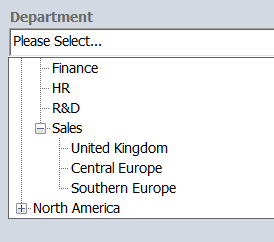
Drill down menus offer a multi-level tree structure for the user to select the metadata value from. When a user makes a selection at the first level,
When creating a metadata field it is possible to populate the information using a menu of choices. Using a menu cuts down on simple mistakes
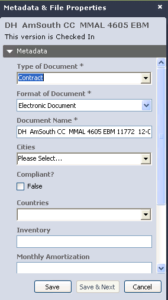
Metadata fields represent the information about a file that users think of when identifying a particular document, like the file name, the customer name, and
Metadata is data that describes other data. You can create the metadata that you want to use for a schema in order to further define
Add groups and users to the schema membership to allow members to: Add documents of this type to the library Edit metadata for documents of
