Excluding/including file types to be indexed
Excluding file types from full-text search Any type of file can be added to FileHold and normally FileHold will index the contents of every file

Excluding file types from full-text search Any type of file can be added to FileHold and normally FileHold will index the contents of every file
The Search Engine Errors report proactively warns Librarians and System Administrators about documents that are not capable of being indexed, search criteria errors, and index

The full-text search engine may not be able to index files that are encrypted, digitally secured, or damaged. The List of Unindexed Files allows you to see
On the Full Text Search (FTS) Status page you can view the status of the search engine. It shows information such as when the last

Watermarks are text that can be applied to each page of a document to indicate a document state, protect, or make it harder to copy

FileHold comes with some out-of-the-box standard reports. However, FileHold uses the Microsoft® SQL Server Reporting Services reporting tools that come standard with Microsoft SQL. This

FileHold recommends using PDF forms instead of Word forms as Microsoft no longer supports the Content Control Toolkit. You can create a “XML Node Extraction

PDF forms contain fillable fields which users can fill out using the free Adobe Acrobat Reader software. The values entered into the fields can be
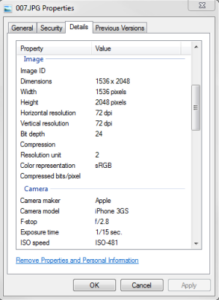
The file properties of a file can be automatically extracted into metadata fields for a defined schema when an extraction rule for that file type
Automating the capture of email metadata allows users to easily store, search, and archive important emails. The document management system can automatically capture metadata from
