
Searching for users
You can search for users by first or last name, or by email. After you have found the user you are searching for, you can

You can search for users by first or last name, or by email. After you have found the user you are searching for, you can
You can use the User and Group Properties to modify or update user and group information. You can view both user and group properties from
A user’s role determines the permissions they may have access to in the system. FileHold comes pre-configured with 12 user roles. The roles are organized
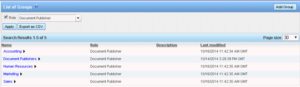
A FileHold Group a collection of users that share specific membership and permissions for the purposes of providing an appropriate level of access to the

In FileHold, users can be added and managed locally or users that exist in a Windows domain can be added locally and managed from the domain.
The Users list can be exported out to a PDF, Excel, or CSV file. Use the filters in the column headers to filter the list,
The list of users is accessible in the Administration Panel in the Web Client under System Management > User Management > Users. The Users list
You will need to evaluate the users of the system and group them into logical groups, such as Accounting, Marketing, Sales, and so on. You
FileHold document management software comes with two distinct administration roles; the Systems Administrator and the Library Administrator. These two roles share the management of the
System Administrators have full control over the entire document management system. The System Administrator needs to have an understanding of not just the technical systems
