Creating workflow templates
You can create as many templates as needed for a particular document type. For example, you many need to create two different workflow templates for

You can create as many templates as needed for a particular document type. For example, you many need to create two different workflow templates for
The PDF converter settings allow you to set up templates that can convert documents to a PDF and, optionally, append workflow information such as the
Metadata can be edited for a document that under a workflow process. In order to use this feature, the option “Enable editing document metadata when

You can set preferences to be notified via email when certain workflow events involving you occur and delegate your tasks to someone else if you
The digital signature log tracks the communication between FileHold and the external signature provider (ESP). The following requests are logged: Requests from the Library Manager

Adobe Acrobat Sign and DocuSign can be used as a part of a FileHold workflow with documents stored in the library. These services are called
In some situations, tasks in a workflow need to be removed from the workflow in progress. Overriding a task removes the task from the workflow

Often users that are participants or observers in a workflow will want to locate those files that are going through review or approval activity in
The Workflow dashboard gives a high-level overview of the all the active, completed, cancelled, overdue, and total workflows for all workflow templates in the system.
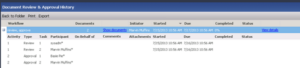
The document review and approval history is essentially a snapshot of the workflow status report but only for the selected document. You can view the
