Microsoft Teams integration
Microsoft Teams is a common tool for collaborating on documents and allows multiple users to edit documents at the same time. The FileHold integration with

Microsoft Teams is a common tool for collaborating on documents and allows multiple users to edit documents at the same time. The FileHold integration with

This article provides support information for troubleshooting the FileHold Desktop Application (FDA). The FDA will run on supported Microsoft operating systems. The following information can

In the event that a locally managed user has forgotten their user ID or password, the system administrator can configure FileHold so that two links
The majority of the end user functionality found in the Desktop Client can also be found in the Web Client with some limitations in the

To access the FileHold web client, you will need to use a valid web browser. See the browsers that FileHold supports. Two-factor authentication may have
The FileHold Desktop Application (FDA) has a very simple, intuitive and familiar Library structure similar to your traditional filing cabinets (cabinets > drawers > folders
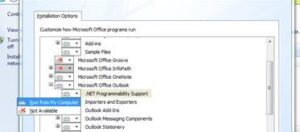
In order to use the FileHold Office Client (FOC), you need a stable and correctly configured Office installation. Your Office installation should have the latest

FileHold software has tight integration with Microsoft Word, Excel, Outlook, PowerPoint, Visio, or OneNote applications to provide a comfortable work environment. The FileHold Office Client
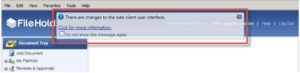
When FileHold is upgraded, a message box will appear in the Web Client that lets the user know that changes have been made to the
