
Tailoring the Courier portal
The Courier portal can be tailored to to match the overall look and feel of an organization. The file to be modified is called courierclient.config

The Courier portal can be tailored to to match the overall look and feel of an organization. The file to be modified is called courierclient.config
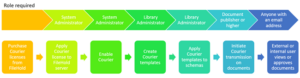
FileHold customers need to send documents stored in the repository or approval tasks to employees, customers, partners, contractors, or associates who are not licensed users

A user with a role of document publisher or higher can initiate a Courier transmission. The only exception to this is if the user belongs
Most of the Courier notifications that are transmitted can be defined in the Courier template itself. The Courier email notifications that are sent to the
The Courier transmission report is a list of all the transmissions that are pending, completed, overdue or expired in the system. It provides an audit
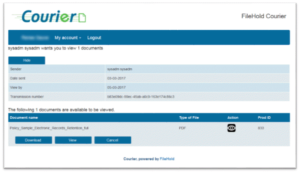
A recipient of a transmission will get an email containing details of the transmission along with a link they can use to view the documents

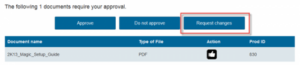
A recipient of a transmission will get an email containing details of the transmission along with a link they can use to approve the documents
The Courier portal is a web page where recipients are directed to once they are sent a transmission from a sender of FileHold. The link
Once the Courier template has been created, a library administrator can assign the template to the schema. Several Courier templates can be added to the
Courier templates are set up for those users who will be transmitting documents for viewing or approving to internal or external users. Templates include the
