
A signature is just one moment in a document’s life.
Control the whole lifecycle, and you can prove the right document was approved and signed by the right person.
Written by Kevin Chang
Takeaways
- Electronic signatures tie each signature to a signer, a timestamp, and transaction evidence, which strengthens accountability.
- The document that gets signed should be the document that was approved, so version control must happen before signing.
- An audit trail turns “here is a signed document” into “here is proof of what happened.”
- Your document or records management system, not the signing platform, should remain the system of record.
- The goal is not to digitize the signature. It is to digitize and control the entire document lifecycle.
TL;DR
Electronic signatures matter in document management because they connect signing to approval, version control, audit trails, and recordkeeping. On their own, they only speed up signing. Integrated with a document management system, they make sure the approved document is the signed document, capture evidence of the transaction, and send the final record to the repository where your retention policies apply.
Managing documents is about much more than storing files in a shared drive. Organizations need to know who created a document, who reviewed it, who approved it, whether it changed, when it was executed, and whether the final version can be trusted.
This is where electronic signatures (eSignatures) play an increasingly important role. Solutions such as DocuSign connect the act of signing with the processes around document approval, accountability, security, and recordkeeping.
What is the difference between document management and document control?
Document management focuses on where a document is stored, who can access it, which version is the latest, and how long to retain it. Document control goes a step further. It maintains integrity, traceability, and controlled progression of documents throughout their lifecycle.
Consider a typical business process:
Create → Review → Approve → Sign → Store → Monitor → Retain
An eSignature solution provides an important control at the “Sign” stage and generates information that supports every stage around it. Instead of emailing a Word or PDF contract and asking someone to print, sign, scan, and return it, you can route the controlled document through an electronic workflow. The recipient reviews and signs, and the system records the transaction and the evidence of the signing event.
How do electronic signatures establish accountability?
Electronic signature workflows associate each signature with a signer and capture details about the transaction. That gives you a stronger record of who signed and when, which is a core goal of document control.
- Electronic signatures tie each signature to a signer, a timestamp, and transaction evidence, which strengthens accountability.
- The document that gets signed should be the document that was approved, so version control must happen before signing.
- An audit trail turns “here is a signed document” into “here is proof of what happened.”
- Your document or records management system, not the signing platform, should remain the system of record.
- The goal is not to digitize the signature. It is to digitize and control the entire document lifecycle.
Rather than relying on an email that says “Approved,” you build approval and signature into a structured process.
How do electronic signatures improve version control?

Version control is one of the most important and most overlooked parts of document management. Picture a contract that has gone through several rounds of revisions. If different versions circulate by email, someone could sign an outdated one.
An integrated document control process reduces that risk by locking in a controlled version before it enters the signature workflow. The objective is simple: the document that gets signed should be the document that was approved.
FileHold ensures that only the latest approved document can be sent for signing. Once execution is complete, the signed document can be stored as the authoritative record, subject to your retention and records management policies.
What does an audit trail add to a signed document?
An audit trail adds evidence. A signature on a PDF shows that someone signed. An audit trail shows how the signing happened. Depending on the platform, configuration, and service level, modern eSignature tools can provide signing events, timestamps, recipients, and other transaction details.
That creates an important distinction between “Here is a signed document” and “Here is the signed document together with evidence of the signing transaction.” In regulated or highly controlled environments, that difference can be significant.
How do electronic signatures strengthen workflow controls?
Document management works best when documents move through predefined processes instead of manual coordination. For example:
Document owner → Reviewer → Approver → Authorized signer → Records repository
An eSignature platform becomes one part of this workflow. You can set rules for who must review or sign, the order in which actions happen, and what happens after completion. That reduces dependence on informal email processes and makes the workflow easier to standardize.
The result is not simply faster signing. It is a more structured document lifecycle.
How do electronic signatures reduce manual handling?
Printing, scanning, emailing, and manually filing documents add unnecessary steps to the lifecycle. Every manual handoff is a chance for:
- Lost documents
- Duplicate copies
- Incorrect versions
- Missing signatures
- Filing errors
- Delayed approvals

Electronic signing removes many of these steps. The bigger gain comes when eSignature is integrated with your document management system, because you can automate what happens before and after signing. A completed agreement can route straight into the right repository with the right metadata and retention controls applied.
Do electronic signatures secure documents on their own?
No. Document control also means making sure sensitive information is available only to the right people. eSignature platforms typically offer controls around recipients, authentication, access, and document handling, but they do not automatically solve every document security requirement.
A mature architecture considers security across the entire lifecycle:
Authoring → Collaboration → Approval → Signature → Storage → Retention → Disposal
Depending on the sensitivity of your documents and your regulatory requirements, you may also need identity management, permissions, encryption, repository security, retention policies, and access monitoring.
Where should signed documents be stored?
In most organizations, the enterprise document management or records management system should remain the system of record. A common mistake is treating the eSignature platform as the final destination for every signed document.
The eSignature platform executes the agreement, captures transaction evidence, and returns the completed document and its information to the right repository. That creates a useful separation of responsibilities:
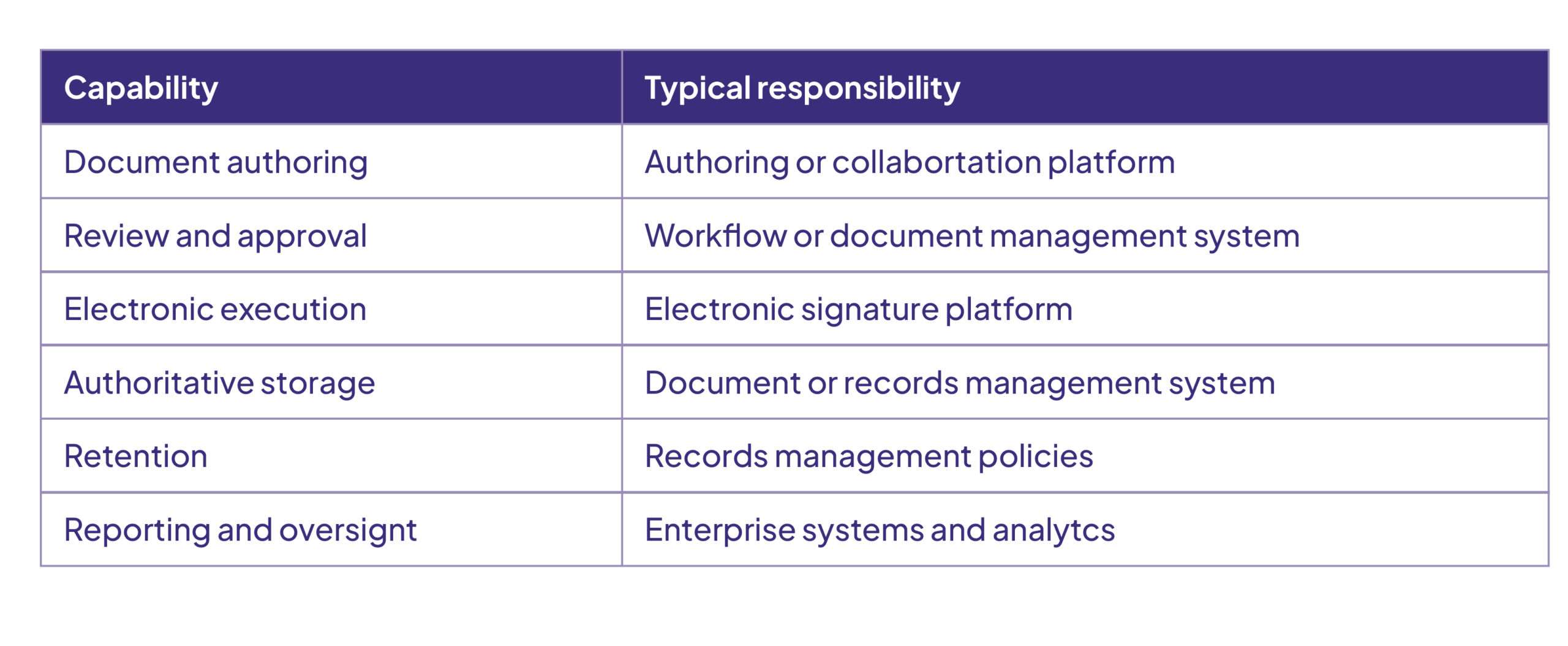
This approach prevents document sprawl, where copies of the same agreement end up scattered across email inboxes, shared drives, eSignature platforms, and personal folders.
Do electronic signatures help with compliance and governance?
They can. For organizations with contractual, regulatory, quality, or internal governance requirements, document control is often essential. eSignatures support governance by giving you a structured way to execute controlled documents and keep evidence of the transaction.
Using an eSignature, however, is not the same as meeting a specific legal or regulatory requirement. The validity and evidentiary requirements for electronic signatures vary by jurisdiction, document type, industry, and organizational policy. Evaluate the laws, regulations, standards, and contractual requirements that apply to you rather than assuming every electronic signature provides the same level of assurance.
Can controlled signing still be easy for employees and customers?
Yes. Document control does not have to mean bureaucracy. A well designed digital signature workflow can make controlled processes easier for employees, customers, suppliers, and partners. Instead of:
Download → Print → Sign → Scan → Email → Wait → Follow up → File
the process becomes:
Review → Sign → Complete
You keep the controls you need while the signer enjoys a much simpler experience. Control behind the scenes and simplicity for the user is one of the biggest advantages of digital document workflows.
Why should eSignature be part of a bigger document strategy?
Because a signature is one event in the broader document lifecycle, and eSignature should not be treated as an isolated technology. The real value appears when it connects with:
- Document management
- Workflow and approvals
- Identity and access management
- Version control
- Audit trails
- Records management
- Retention policies
- Business applications
- Compliance processes
In other words, the goal is not simply to digitize the signature. The goal is to digitize and control the entire document lifecycle.
Conclusion: What makes a signing process truly controlled?

As organizations move away from paper processes, electronic signatures have become an important building block of modern document management and control. Platforms such as DocuSign help move documents through controlled approval and execution while providing transaction evidence and reducing manual handling.
The greatest benefit comes when eSignature is part of a broader information management architecture. A well designed solution answers more than “Who signed this document?” It also answers:
- Was the right document approved?
- Did the right person sign it?
- When was it signed?
- Can we demonstrate what happened?
- Where is the authoritative record?
- Can we manage that record throughout its lifecycle?
That is the difference between simply signing documents electronically and building a truly controlled digital document process.
FileHold integrates directly with DocuSign, giving you simple processing flows while maintaining version control, history, and a full audit trail.
