New Reports for FileHold 12
We are continuing to showcase the new document management software features in the next release. Today’s post will describe the new reports. The new reports

We are continuing to showcase the new document management software features in the next release. Today’s post will describe the new reports. The new reports

System Administration and Library Administration Features Available in Rich Desktop Client In FileHold 12, the most frequently used System Administration and Library Administration functions will
FileHold 12 improves the scalability of the document management software to accommodate even greater number of documents being stored. Introducing Limitless Document Storage for Enterprise
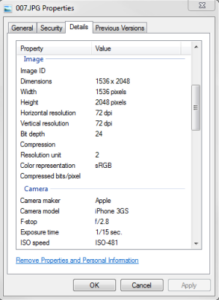
Automatically Extracting Metadata from the Document Properties of any Document Type The document properties of a document can be automatically extracted into metadata fields for

Automatically Extracting Metadata Values from Content Controls in Microsoft Word Documents (e-Forms) in FileHold 12 In FileHold 12, you can now create a “XML Node
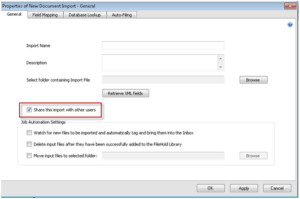
There are several enhancements to the Manage Imports tool in the document management system. Sharing Imports and Inboxes – Shares imports of documents and the
This is a common question we get at FileHold and for good reason. Deciding what approach you should take when starting a document management project

In FileHold 12 you can set the screen you want to see after logging into the FileHold Desktop Application (FDA) opens. You can set one
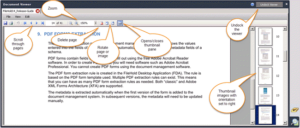
A new viewer, called the PDF/Image viewer, is available in FileHold 12. All NEW purchases and upgrades to FileHold 12 receive two PDF/Image viewer licenses
Several enhancements have been made to the document workflow software functionality in FileHold 12. Library Administrator Workflow Status Report The Library Administrator’s Document Workflow Status
